Well, i follow some random people on Twitter and also some big names too, i like to follow technology and social media Twitter accounts and I get some great idea’s from reading peoples tweets. But i recently followed @Clik.
I got a Direct Message (DM) from Clik the other day to try their iPhone app, i thought “why not give it a crack!”, so i downloaded the CLIK app (which is free) from iTunes and installed it on my phone.
I ran the app and was instantly amazed.
So, you run the app on your phone and follow the very simple instructions, you dont have to sign up for anything, just run it, then on a device which has a browser, visit www.clikthis.com. The browser will then produce a QR code on the screen, hold up your phone which is running Clik, point it at the browser and it scans the QR code in automatically. Now, look back at your iPhone again and now there is a list of video’s you can browse, select a video or search for a video to play but instead of watching it on your phone, it will play in the browser… now i think this is pretty sweet… i am totally amazed!!!
Clik describes themselves as “a brand new Smart TV platform that lets you turn any screen with a browser into your screen by simply scanning it with your smartphone” as per their twitter bio.
All in all, i must say, this is one of my favourite iPhone apps at the moment…
I also tried bringing up the browser on a D-Link Boxee Box and once again, this app just magically works, HD Video’s on the big screen! NICE!
So if you havent tried CLIK, give it a go and download it to your iPhone or Android today!
Head on over to http://discover.clikthis.com/ and check it out… by the way, i also love their site… Nice jobs CLIK!
it’s simple, why didn’t anyone else thing of it?
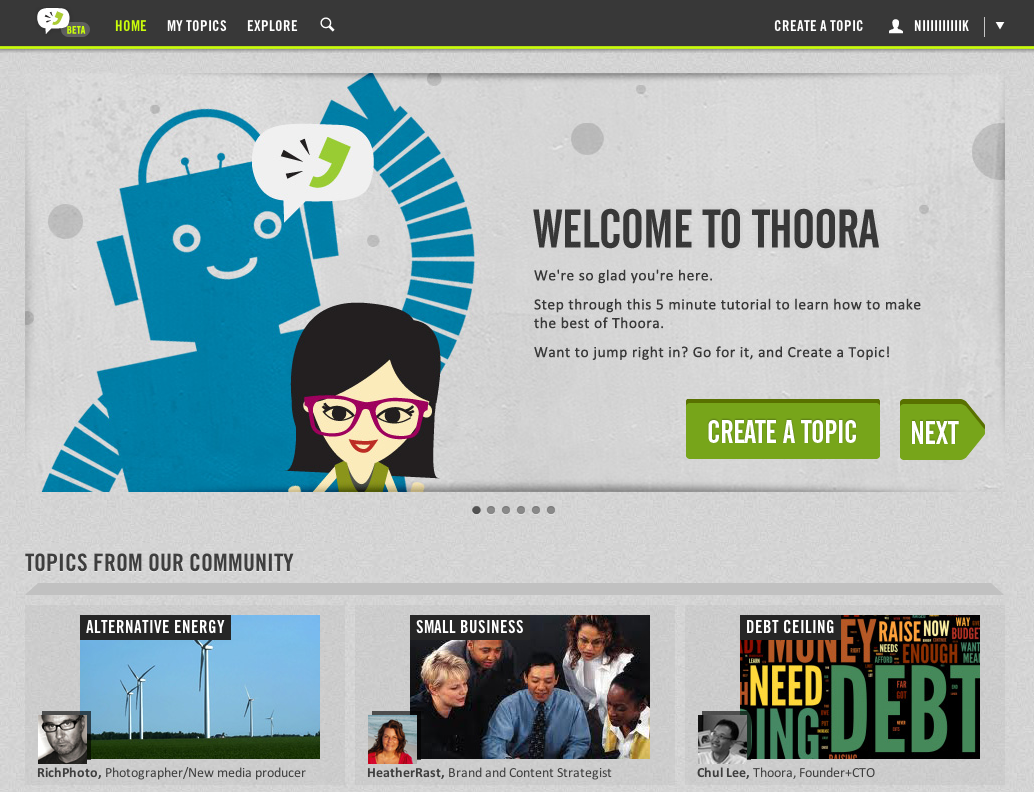
Finding informative content on the web is as important. THOORA has way to discover and share this content by you creating topics, or simply use some of THOORA’s.
You could describe THOORA as a Tivo for Web content, click the ‘heart’ to like the story, click the ‘trash can’ if you are not a fan, after a while, THOORA will get smarter and really deliver the content you want to read about.
Got an RSS feed? no problem, THOORA can also suck this into your content feed. Got someone you want to follow on Twitter, also not a problem, add their Twitter name… let THOORA sought through it all.
I have instantly fallen in love with this site, great design, got a great infographic feel to it, easy to use navigation. I can’t wait for an iPhone app for this one, i know it will be something which i will want to flatten my battery with!
Looking to monitor your social networks? Check out this extensive lists of Social Media Monitoring Solutions courtesy of Stumbleupon.com
http://www.stumbleupon.com/su/1aNkRx/wiki.kenburbary.com
Do you recommend any? Let us know and leave a comment below.
Do you jump onto twitter and follow everyone who is tweeting about a live television show? If so, you should give “Twelevision” a crack!
Download the Twelevision app from iTunes (price – Free for a limited time) and log on in with your twitter account. It will ask you to pick your state and area (in Australia) and bobs your uncle.
It will hook into the Australian tv guides and will have the channel listing on the left hand side. Simply pick a channel and a show and watch everyone tweeting about it… You can also join in on the fun and tweet too.
**UPDATE**
So after using Twelevision over the last 24 hours, i found some nice hidden bits which i didnt discover the night before. So i thought i would tell you about them!
If you click on a channel/show to tweet about and select someones tweet, the screen slides across, you can then preview the selected tweet, reply to it or simply retweet. You are also able to give someone a “sticker”, Twelevision define a sticker as “No need to type your opinions, there is a suite of emotion-charged Response Stickers you can slap on any tweet with one touch.” You select one of the 8 stickers for a quick responce to someones tweet which is a nice way to let someone know how you feel without having to waste time thinking of something to respond with, that makes it nice and easy! Some of the other features are, you can view the persons Twitter profile, view their latest Tweet(s), see who they are following, you can also add their followers to your Twitter account, see what they are watching PLUS see if they have earned any Twelevision badges.
Speaking of badges, similar to other social networking applications such as FourSquare, users who utilise Twelevision can earn badges the more they use the app. Some of the badges you can earn are “Drama Queens, Couch potato, Rookie and Night Owl”. This gives the user a bit of a goal when using the app and we all want those badges!
Other advanced options are customising your channel listing, so here you can turn on or off what channels to view on your TV guide and just like Twitter itself, you can view your “mentions” and “recent tweets“.
The more i use Twelevision, the more i am loving it, this app is really catered to the avid fan who likes tweeting about live TV shows, if that sounds like you, get yourself a copy today!
Twelevision is available for iPad and now iPhone.
For more information on the app, visit their website at www.twelevision.com.au
If you use twitter and you want to keep track of your tweets, check this service out.
Twistory or TWItter hiSTORY.
You can use their free account but the pro account is well worth the big US$1 per month.
So what Twistory will do, it will download your tweets into your iCal, Outlook or google calendar, you can set it to download multiple times per day and it places all your tweeting into you calendar, so you can see on this day, i tweeted “blaaaaa….” It’s great for backing up your tweet’s and making a diary of them.
Get it today…. Twistory.